
How My Portfolio Stays Updated Without Me Touching Code
Why I stopped copying repository details into my portfolio codebase, and how I turned GitHub into the single source of truth for my featured projects.
On this page9 sections
Every time I finished a new project, updating my portfolio felt like duplicate paperwork.
The code was already pushed to GitHub. The title was there, the repository description was written, the tech stack was already tagged in repository topics, and the live demo link lived inside the repository's About section. Yet, to showcase it on my personal site, I had to open my portfolio codebase, duplicate the metadata into a JSON file, download a screenshot, format the card, commit, and push a new build.
I build things to solve problems, not to maintain redundant spreadsheets across my own websites.
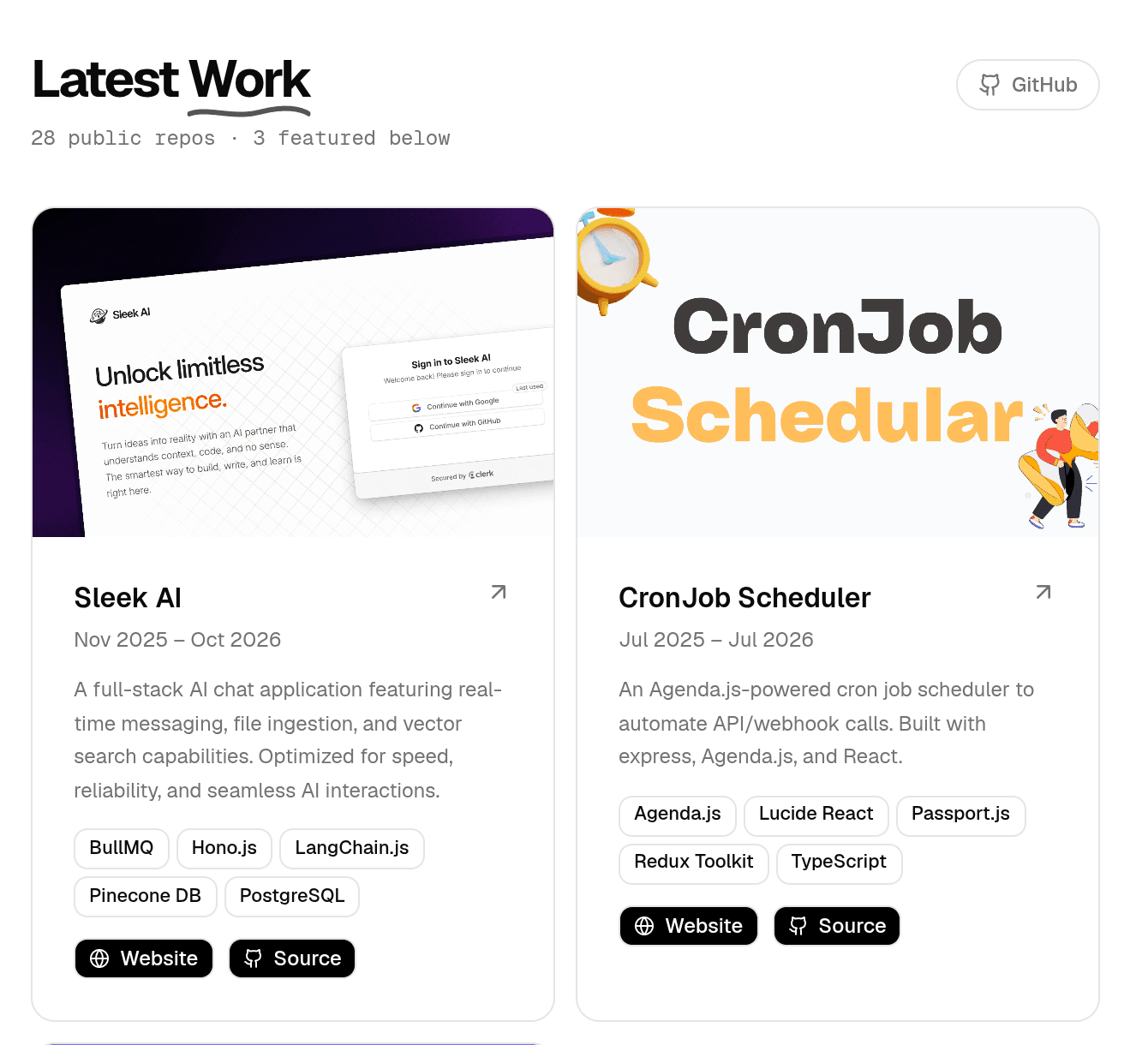
Here is how I replaced manual portfolio updates with a single GitHub REST API integration, solved the missing preview image hurdle, and filtered signal from noise using topic tags and .
The Problem: The Redundant Maintenance Trap
Whenever you build a project, you already provide its core identity on GitHub:
- The project name and slug
- A short summary in the repository description
- The live demo URL inside the repository metadata
- Topics describing the libraries and frameworks used
Copying this exact information into a hardcoded projects.json file creates two sources of truth. If you improve a project description or change a demo URL on GitHub, your portfolio immediately becomes outdated unless you remember to update both places.
Eventually, friction wins. You skip updating the portfolio for smaller releases, and your showcase goes stale.
The solution was clear: treat GitHub as the single source of truth and make the portfolio consume it automatically.
Step 1: Querying the GitHub REST API for Repository Metadata
GitHub exposes an unauthenticated REST API endpoint for public repositories that returns clean, structured metadata:
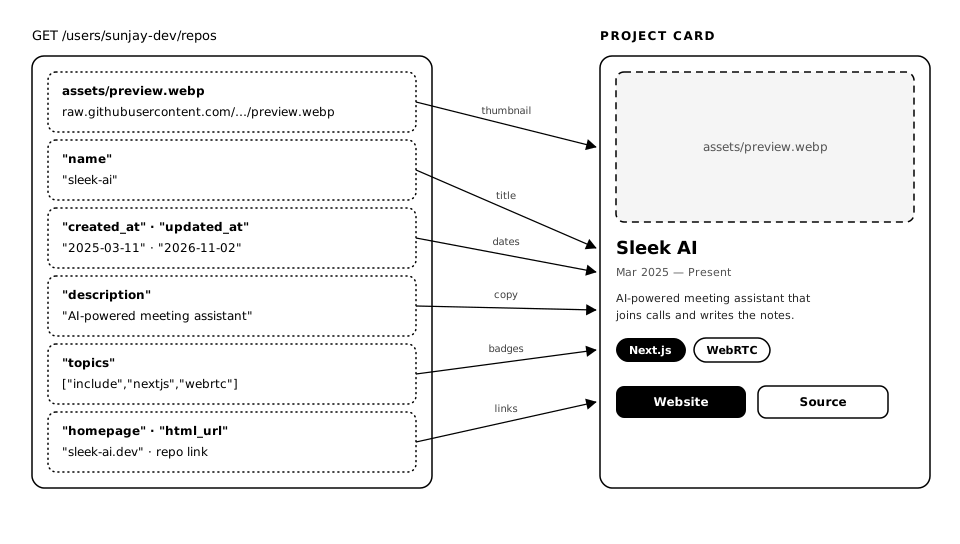
https://api.github.com/users/{username}/repos?sort=created&direction=desc&per_page=20Calling this endpoint for a profile returns an array of repository objects. Each object provides nearly everything needed to populate a standard portfolio card: the repository title, the summary description, the GitHub repository link, the live demo URL (homepage), and an array of repository topic tags. The payload below is trimmed to the fields the card actually reads, and simplified for readability:
[
  {
    "name": "developer-portfolio",
    "full_name": "sunjay-dev/developer-portfolio",
    "description": "Minimalist developer portfolio built with Next.js and Tailwind CSS.",
    "html_url": "https://github.com/sunjay-dev/developer-portfolio",
    "homepage": "https://sunjay.xyz",
    "default_branch": "main",
    "topics": ["include", "nextjs", "typescript", "tailwind"],
    "fork": false,
    "created_at": "2024-03-15T10:00:00Z",
    "updated_at": "2026-11-10T14:30:00Z"
  }
]
One caveat sits in that URL: per_page=20 with sort=created returns only the 20 newest repositories by creation date, so an older project tagged include never makes the list.
Here is how that fetch request looks inside a Next.js Server Component:
// src/components/sections/Projects.tsx
import User from "@/data/user.json";

type Repo = {
  name: string;
  html_url: string;
  description: string;
  topics: string[];
  fork: boolean;
  created_at: string;
  updated_at: string;
  full_name: string;
  default_branch: string;
  homepage: string;
};

export default async function Projects() {
  // Username and fetch limit come from src/data/user.json
  const userName = User.social.github.userName;
  const repoCount = User.social.github.reposFetchLimit || 20;

  try {
    const res = await fetch(
      `https://api.github.com/users/${userName}/repos?sort=created&direction=desc&per_page=${repoCount}`,
      { next: { revalidate: 3600 } }, // Cache revalidation window
    );
    if (!res.ok) throw new Error("Failed to fetch repos");
    const repos: Repo[] = await res.json();

    // ... filtering & rendering logic
  } catch (err) {
    console.error(err); // an empty section beats a crashed page
  }
}
This gave me the data I needed without third-party dependencies or custom databases.
Step 2: The Missing Thumbnail Problem
While the GitHub API provides repository metrics and metadata, it does not provide an image preview or banner URL.
The GitHub (https://opengraph.githubassets.com/...) only generate generic repository cards with avatar and star counts. They do not show actual UI screenshots of what the web application looks like. GitHub does let you replace the generated card with a custom social preview image, but it's a one-off manual upload for every repository — exactly the kind of per-project upkeep I was trying to remove.
I did not want to upload images to an external S3 bucket or Cloudinary account just to show a card thumbnail. That would defeat the goal of zero-maintenance workflows.
The Solution: Predictable Raw Asset URLs
GitHub serves any raw file from a public repository via raw.githubusercontent.com.
By establishing a lightweight convention across my repositories, every project stores its preview image at the exact same relative path:
my-project
assets
- preview.webp
src
- README.md
Using this pattern, the card component constructs the image URL deterministically using the repository's full_name:
const branch = project.default_branch || "main";
const previewUrl = `https://raw.githubusercontent.com/${project.full_name}/${branch}/assets/preview.webp`;
In the frontend card component, Next.js attempts to load this asset. If a repository does not have a screenshot, an error fallback ensures the card degrades gracefully to a neutral background rather than breaking the layout:
// src/components/cards/ProjectCard.tsx
"use client";

import { useState } from "react";
import Image from "next/image";

function PreviewImage({ src, alt }: { src: string; alt: string }) {
  const [imageError, setImageError] = useState(false);

  if (!src || imageError) {
    return <div className="h-48 w-full bg-muted" />;
  }

  return (
    <div className="relative h-48 w-full">
      <Image src={src} alt={alt} fill unoptimized className="object-cover" onError={() => setImageError(true)} />
    </div>
  );
}
Whenever I want a preview picture on my portfolio, I drop preview.webp into the repository's assets directory. No extra uploads or config files required.
Step 3: Eliminating Noise with the "include" Tag
Fetching the latest repositories created a new problem: noise.
Like most developers, my GitHub profile contains utility scripts, experimental spikes, test repositories, forks, and unfinished sandboxes. Dumping raw repository feeds directly onto the portfolio would clutter the showcase with irrelevant projects.
I needed an intuitive way to curate which projects show up without maintaining an allowlist file inside the website repo.
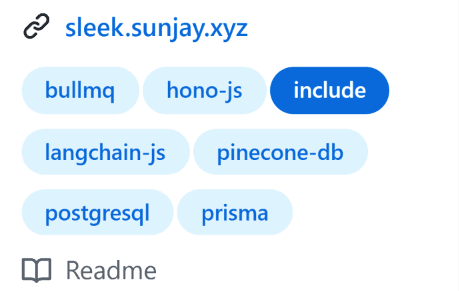
The answer was already built into GitHub: Repository Topics.
The Filtering Logic
Inside the fetch loop in Projects.tsx, repositories must satisfy three criteria to make the cut:
- It must not be a fork (
!repo.fork). - It must have the
includebadge. - Only the 4 most recently created matched projects are displayed.
import { FEATURED_TOPIC } from "@/lib/github";

const filtered: Repo[] = [];

for (const repo of repos) {
  if (filtered.length >= 4) break;
  if (!repo.fork && repo.topics?.includes(FEATURED_TOPIC)) {
    // carries the "include" badge
    filtered.push(repo);
  }
}
Step 4: Publishing Without Touching the Portfolio Code
With GitHub providing both metadata and asset URLs, the final question was deployment.
If the page is purely static, changing a tag on GitHub would still require triggering a manual redeploy on Vercel. If the page is purely dynamic server-rendered, every visitor triggers a pair of unauthenticated, on page load.
Next.js Incremental Static Regeneration (ISR) provides the middle ground:
const res = await fetch(`https://api.github.com/users/${userName}/repos?sort=created&direction=desc&per_page=${repoCount}`, {
  next: { revalidate: 3600 }, // 1 hour cache
});
The End-to-End Workflow
Here is how adding a new project works in practice now:
- I create or push a repository on GitHub.
- In the repository's "About" section, I paste the live demo link and add the
includebadge. - If I want a cover screenshot, I commit
assets/preview.webp. - Once the one-hour cache window expires, the next visit triggers a background revalidation: Next.js re-queries the GitHub API, picks up the newly tagged project, and the refreshed page goes live.
There is no pull request, no commit to the portfolio website, and no manual redeploy. The only things left on my side are the two decisions GitHub can't make for me: tagging the repository and, when I have one, dropping in a preview image.
What I Learned
This was a relatively small change, but it removed an unnecessary step from maintaining my portfolio.
I can now manage the projects I want to showcase directly through GitHub. The portfolio takes care of fetching the repository information, selecting featured projects, and displaying their previews.
There are still a few things to consider, such as rate-limited GitHub API requests and keeping preview images available, but for my needs, this approach works well.
I no longer need to open the portfolio codebase every time I want to add or update a project.